Should You Use AI to Triage Support Requests and Service Questions Before They Reach Your Team? A Small-Business Guide to Faster Replies and Less Admin Drag
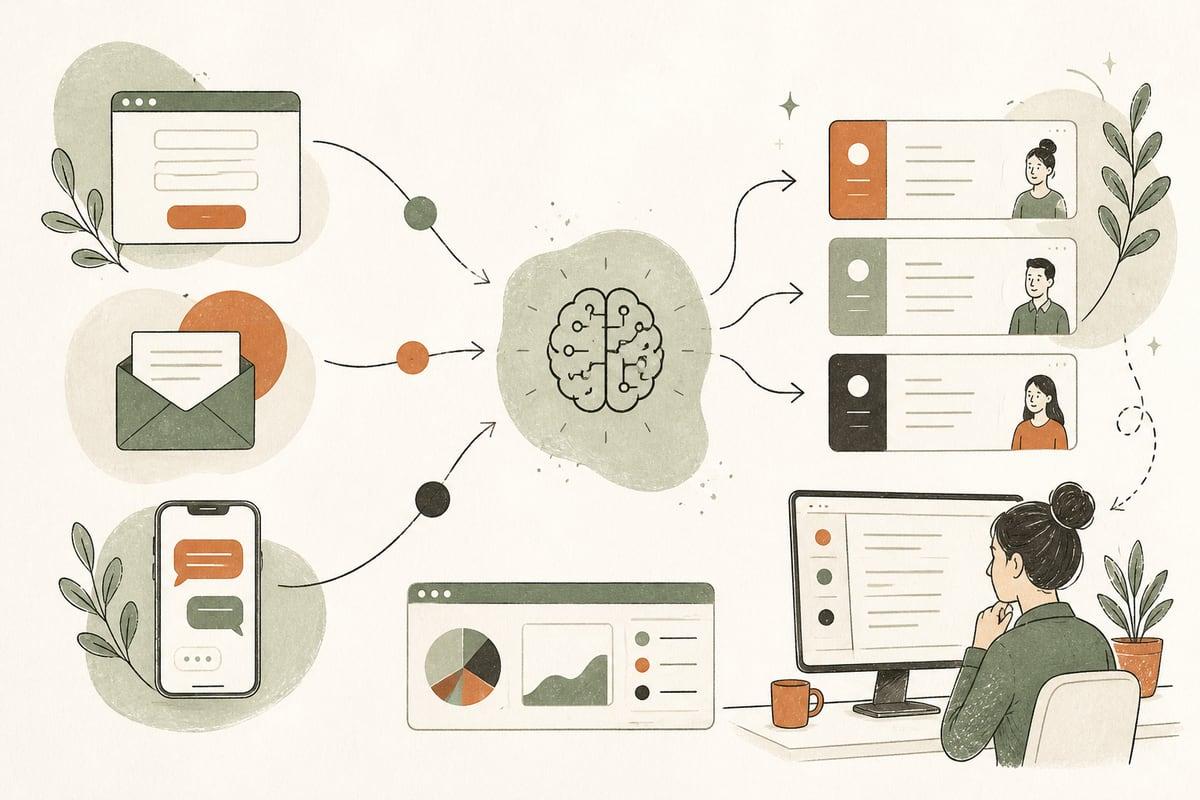
If your team spends too much time sorting incoming questions, status checks, and basic service requests, AI triage can help immediately. The right setup can give customers faster answers, route the right issues to the right person, and cut down on admin work without making your business feel robotic.
What AI triage actually means for a small business
AI triage is not the same as handing your customer service over to a bot. In a practical small-business setup, it usually means AI helps with the first layer of intake:
- reading a message from a form, email, chat, or text
- identifying what the person needs
- tagging urgency or topic
- sending a quick, useful first response
- routing the request to the right person, inbox, or workflow
- collecting missing details before a human steps in
For example, a clinic might receive messages about appointment changes, insurance questions, records requests, and new-patient inquiries. A law firm might get consult requests, document follow-ups, billing questions, and court-date concerns. A contractor might see estimate requests, job-status questions, warranty issues, and scheduling changes.
Without triage, everything lands in one inbox and somebody has to sort it manually. With AI triage, the sorting starts instantly.
When AI triage makes sense
This works best when your business has a steady flow of repeatable inbound requests and the delay is not in writing a perfect answer, but in figuring out what the message is and where it should go.
AI triage is worth considering if:
- your front desk or admin team keeps answering the same first-step questions
- requests from your website, email, and text arrive in different places
- response speed is slipping during lunch, evenings, or busy days
- urgent issues sometimes get buried under low-priority messages
- staff members forward messages internally just to find the right owner
- customers complain that they are waiting for a reply or do not know what happens next
- you want to reduce repetitive admin work without hiring another coordinator yet
In short: if the problem is intake chaos, AI triage is often a better first automation than trying to automate everything.
What kinds of requests AI can triage well
Small businesses usually get the best results when AI handles structured, repeatable categories first.
Good candidates include:
- new service inquiries
- appointment change requests
- estimate or quote questions
- billing questions
- document or records requests
- status-check messages
- basic eligibility or service-area questions
- product or service FAQs
- support-ticket categorization
- internal handoff notes for the next team member
Less ideal candidates include:
- emotionally sensitive complaints that need a human touch
- legal, medical, or financial advice situations
- highly unusual edge cases
- messages where the customer is already upset and tone matters a lot
- anything requiring a licensed professional’s direct judgment
That does not mean AI cannot help in those situations. It means the safest role is to recognize them quickly and escalate fast.
The real business benefit: less delay, less confusion, fewer dropped balls
Most owners do not need AI because it is trendy. They need it because every minute spent sorting messages is a minute not spent serving customers or closing work.
A strong triage workflow can improve operations in a few concrete ways:
1. Faster first response
Even a simple reply like “We got your request and here’s what happens next” reduces uncertainty. That matters when someone is comparing multiple businesses.
2. Better routing
Instead of one general inbox, requests can go to:
- sales
- scheduling
- billing
- support
- a specific location
- a Spanish-speaking team member
- an after-hours queue
3. Better information collection
If a request is incomplete, AI can ask for missing details before it reaches your staff.
Examples:
- property address for a contractor
- preferred appointment time for a clinic
- matter type for a law office
- account or invoice reference for billing
4. Less interruption for your team
When your staff is not constantly re-reading messages just to figure out who handles them, they can focus on higher-value work.
5. Cleaner reporting
Once requests are categorized consistently, you can actually see what is coming in most often and where bottlenecks are happening.
A simple AI triage workflow example
Here is what a practical setup might look like for a local service business:
- A customer submits a website form, sends a text, or emails support.
- AI reads the message and classifies it as one of several categories.
- If needed, AI sends an instant reply asking for one or two missing details.
- The request is tagged by type, urgency, and location.
- It is pushed into the right inbox, CRM, help desk, or project system.
- A staff member gets the request with a short summary and suggested next action.
- If the request falls outside the approved rules, AI flags it for direct human review.
This is usually far more useful than a generic chatbot that just says, “How can I help you?”
How to set it up without creating a mess
The biggest mistake is trying to automate too much too early. Start with one channel, a small set of request types, and clear handoff rules.
Use this checklist.
Step 1: Audit your incoming request types
Review the last 50 to 100 inbound messages and sort them by theme.
Look for:
- the top 5 to 10 repeated request types
- the messages that waste the most admin time
- the messages that require immediate attention
- the questions people ask before they buy
Step 2: Decide what AI should and should not handle
Create three buckets:
- AI can answer directly
- AI can collect details and route
- human only
This boundary matters. It protects customer experience and reduces risk.
Step 3: Write approved responses and escalation rules
Do not let AI improvise your business process from scratch.
Prepare:
- approved first-response templates
- category definitions
- escalation triggers
- office-hour vs after-hours logic
- language or location routing rules
Step 4: Connect it to your actual tools
The workflow should feed the systems your team already uses, such as:
- CRM
- help desk
- calendar or scheduling software
- Slack or Teams
- text messaging platform
If the automation creates a second hidden system nobody checks, it will fail.
Step 5: Monitor and refine weekly
In the first month, review:
- miscategorized requests
- delayed escalations
- confusing replies
- messages that should bypass AI entirely
Good automation gets better through supervision, not neglect.
Common mistakes to avoid
AI triage can save time, but only if it is designed around real operations.
Avoid these mistakes:
Using vague categories
If everything is labeled “general inquiry,” nothing improves. Categories should reflect your actual workflow.
Giving AI too much authority
It should not make promises, give regulated advice, or commit to things your team has not approved.
Ignoring tone
A fast response that sounds cold or robotic can hurt trust. Especially for clinics, law firms, and sensitive service businesses, tone matters.
Failing to define urgency
Some requests should jump the line. If your system cannot recognize that, it may create more risk, not less.
Not telling customers what happens next
People do not just want an answer. They want clarity.
A good response should explain:
- that the message was received
- whether more details are needed
- when a human will reply
- what channel the follow-up will use
What ROI should you expect?
The payoff is usually operational before it is dramatic on paper.
You may see value through:
- fewer missed or delayed requests
- less staff time spent sorting inboxes
- better lead handling during busy hours
- faster response speed for high-intent prospects
- fewer handoff mistakes
- a better experience for existing customers
For many small businesses, that means better conversion at the top of the funnel and less friction after someone becomes a customer.
The trade-off: AI triage is not a magic switch. It needs setup, rules, and oversight. If your internal process is messy, AI may expose that before it fixes it. That is actually useful, but it is worth knowing upfront.
Who should do this first?
This is usually a strong fit for:
- clinics and healthcare practices managing high message volume
- law firms sorting consults, case updates, and admin questions
- contractors handling estimates, scheduling, and service issues
- nonprofits fielding inquiries from donors, clients, and partners
- local service businesses with one overloaded front desk or office manager
If your team keeps saying, “We need someone just to manage incoming messages,” AI triage may be the more efficient first step.
The bottom line
If customer requests are piling up, getting misrouted, or eating too much admin time, AI triage is worth serious consideration. Done right, it does not replace your team. It helps your team respond faster, stay organized, and spend more time on work that actually moves the business forward.
If you want help designing an AI triage workflow for your website, inboxes, or customer communication tools, you can book a free consultation at https://webmasterandmore.com/consultation.
Frequently asked questions
Can AI triage work without a chatbot on my website?
Yes. It can process website forms, emails, texts, and other inbound messages without requiring a live chat widget.
Will customers know they are talking to AI?
They should not be misled. In many setups, AI handles the first sorting and response step, then a human follows up as needed.
Is AI triage only for large companies?
No. Small businesses often benefit the most because one busy inbox or front desk can create major bottlenecks.
Can AI triage integrate with WordPress and my current tools?
Usually yes. It can often connect with WordPress forms, CRM systems, scheduling tools, email platforms, and texting systems.
What is the safest way to start?
Start with one channel, a limited set of request types, and clear human escalation rules. Then expand once the workflow is accurate and reliable.
Free 2-minute assessment
Where could AI actually save your business time?
Answer a few questions about how you work today and get a personalized report on where AI and automation would pay off first — no email required to see it.
Take the free AI assessmentOr just take one tip a month
A short monthly email with one practical way to make your website work harder. No spam, unsubscribe anytime.